EDUCATION AND TEACHING
Access to Bologna Course Information via QR Codes on Attendance Lists
Our university has revised the process for sharing course syllabi with students and monitoring attendance records through the Student Information Management System (UBS).
The “Attendance List” report generated by academic staff through UBS now includes a course-specific QR code at the top. By scanning this code, students can access the course's Bologna Course Information Package page directly.
What information can be accessed via the QR code?
Students can scan the QR code to access the course aims, learning outcomes, weekly course plan, resources and assessment information directly.
PRACTICAL EXAMPLE
Using the QR Code on the Attendance List
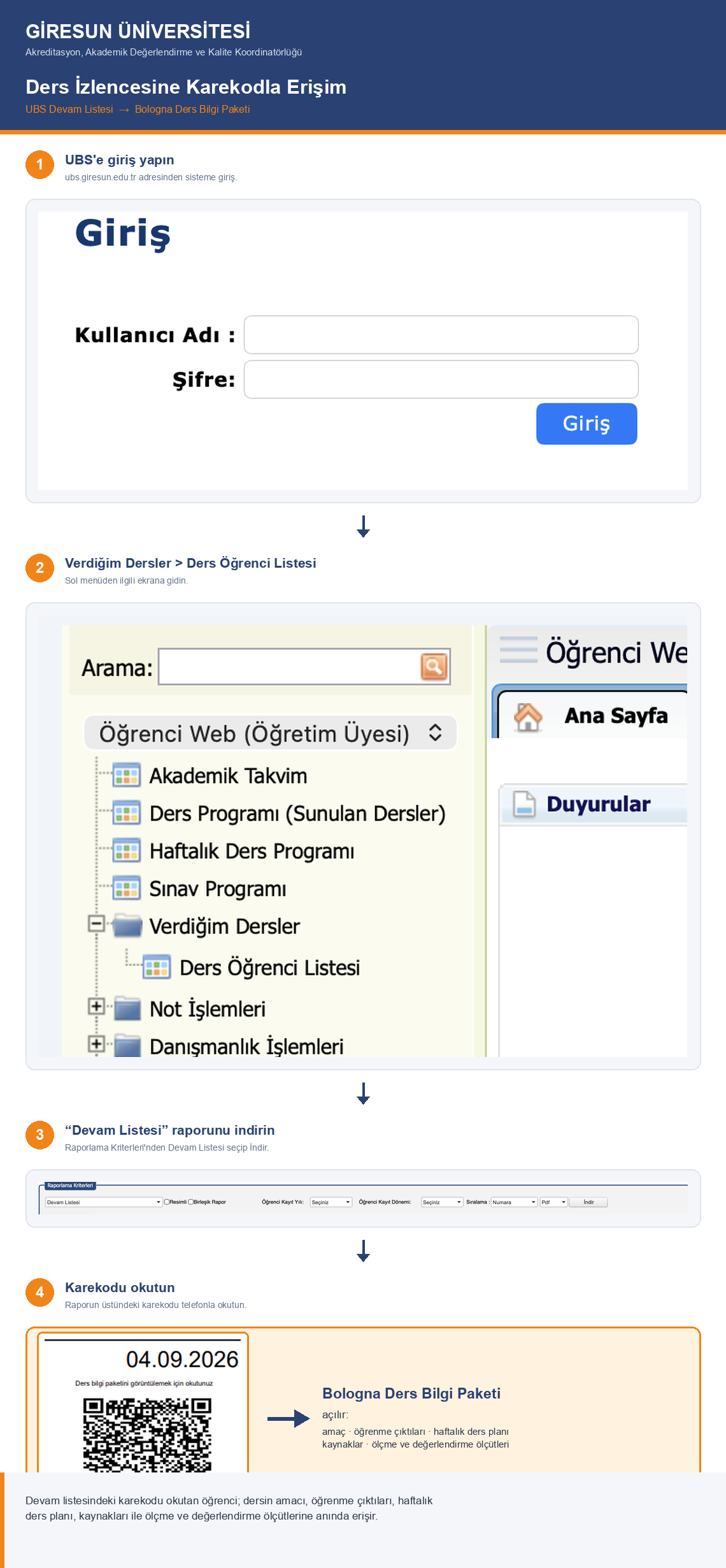
The image below shows the location of the QR code on an attendance list generated through UBS and how students can access the Bologna Course Information Package.
Click the image to view it at full size.
VIDEO TUTORIAL
How to Access Bologna Course Information via a QR Code
Watch the short video below to learn how to use the QR code on an attendance list generated through UBS.
STEP-BY-STEP GUIDE
How Does It Work?
2
Open the course student list
From the menu, navigate to Courses I Teach → Course Student List.
3
Generate the Attendance List report
Select “Attendance List” from the reporting options to generate the report.
4
Scan the QR code
Scanning the QR code at the top of the attendance list opens the Bologna Course Information Package for the relevant course directly.
What Has Changed?
The new approach brings together the sharing of course syllabi and the documentation of attendance records within a single process.
Previous Approach
Course syllabi had to be shared separately with students at the beginning of the semester, and supporting documentation had to be prepared.
|
New Approach
Attendance lists will be generated through UBS and used weekly. The QR code on the same document will provide students with ongoing access to the course syllabus.
|
Benefits of the New Approach
The new system ensures that attendance records are documented regularly and that students can access the course syllabus throughout the semester, rather than only at its beginning. Students can therefore check weekly course topics, learning outcomes and assessment criteria whenever they need to.
Basis
Official letter dated 04.09.2026, reference E-50169252-100-206074, issued by the Accreditation, Academic Evaluation and Quality Coordination Office of the Rectorate of Giresun University.
Last Updated: 07.09.2026